
Do you want to have the most secure IAM Policies on the block? Start using this guardrail today.

Having a security first mindset is not an option in today’s world. Have you heard of the Principle of Least Privilege (sometimes abbreviated as PoLP)? If not, this is something you need to know about.
The Principle of Least Privilege means that you are only giving the minimum permissions required to do the job. Nothing more. This also means removing permissions when they are no longer needed.
Security Risks with IAM Permissions
AWS’s IAM Roles create an interesting set of potential security issues. Especially for software developers.
One of the issues that is often talked about is when developers have the iam:CreateUser (or Role) and iam:AttachUserPolicy(or RolePolicy) actions in their permissions policy. The combination of these permissions is what’s called an escalation vector and something that you should be on the lookout for.
Woah, I need those Permissions!
I hear you saying, “I legitimately need these permissions as part of my daily development activities”. I know, I need them also! So how do we solve this potential security issue and keep us safe but still allow us to do our job, in case our credentials are compromised or we have an ‘oops’ moment?
For just this case, AWS has created a guardrail for us to use.
Permissions Boundaries
Permissions Boundaries are IAM Policies attached to a developer’s IAM entity (a User or a Role). They specify the maximum set of actions that a developer can perform directly themselves, but they can also limit the actions of any entity that the developer creates.
This is especially useful because it solves the escalation vector for creating an IAM User or Role and attaching a Policy — which is a common development task.
Remember that a Permissions Boundary only states the maximum permissions possible — it doesn’t actually grant any permissions.
This means that you’ll need to remember to take both the identity or resource-based policy and the Permissions Boundary into account for an entity to understand what actions they can and cannot perform.
Let’s look at an example using the AWS CLI:
The Scenario
Steve is a developer for Company XYZ and needs to be able to create an IAM User and attach policies to that user. For simplicity, let’s say that Steve has an IAM User that he uses for his development activities and there is a Permissions Boundary applied directly to his User.
In a larger organization, a Permission Boundary would be best applied to an IAM Role that developers assume into, as opposed to applying directly to an IAM User.
Steve’s Permissions Boundary
Steve’s IAM User has a Permission Boundary Policy attached to it that looks like this:
{
    "Version": "2012-10-17",
    "Statement": [
        {
            "Action": [
                "iam:ListUsers",
                "iam:GetAccountPasswordPolicy",
                "iam:CreateUser",
                "iam:AttachUserPolicy"
            ],
            "Resource": "*",
            "Effect": "Allow",
            "Sid": "AllowIAMRoleCreation"
        },
        {
            "Action": "s3:*",
            "Resource": "*",
            "Effect": "Allow",
            "Sid": "AllowS3Access"
        }
    ]
}
Let’s call it CompanyXYZPermissionsBoundary.
Recall that the Permissions Boundary does not allow Steve to actually perform any actions.
Steve needs an identity-based policy attached to his User as well to actually give him permission to do something.
If Steve tries to run a command to create a User with no identity-based policy, he will get an error:
aws iam create-user \
  --user-name IAMUserCreationTest
Output Error:

Now, let’s attach a Policy to Steve’s User that let’s him create an IAM User.
This Policy is attached to Steve’s User and allows him to create an IAM User (among other things), but only if the same permission boundary is attached to the User he creates. This prevents him from creating a User that can execute higher privileges than he is allowed to give.
Steve’s Identity-Based Policy
{
    "Version": "2012-10-17",
    "Statement": [
        {
            "Sid": "CreateOrChangeOnlyWithBoundary",
            "Effect": "Allow",
            "Action": [
                "iam:AttachUserPolicy",
                "iam:CreateUser",
                "iam:DeleteUserPolicy",
                "iam:DetachUserPolicy",
                "iam:PutUserPermissionsBoundary",
                "iam:PutUserPolicy"
            ],
            "Resource": "*",
            "Condition": {
                "StringEquals": {
                    "iam:PermissionsBoundary": "arn:aws:iam::{account_id}:policy/CompanyXYZPermissionsBoundary"
                }
            }
        },
        {
            "Sid": "s3BucketsAccess",
            "Effect": "Allow",
            "Action": [
                "s3:ListAllMyBuckets"
            ],
            "Resource": "*"
        }
    ]
}
If Steve tries to run the same command to create a User now that he has the identity-based policy attached to his User, he will still get an error:
aws iam create-user \
  --user-name IAMUserCreationTest
Output Error:
This is because he didn’t attach the Permissions Boundary when creating the User, as specified in the condition on the identity-based policy attached to his User.
Finally, it works!
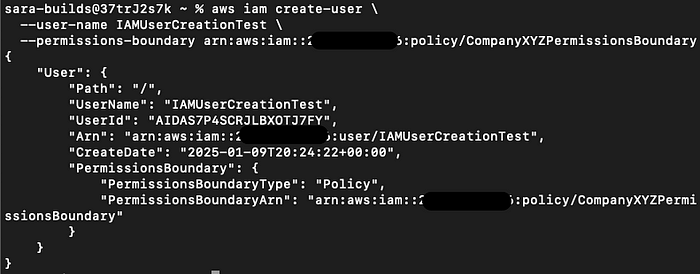
If he tried to create that User again, but with the Permission Boundary required, he is able to create that User:
aws iam create-user \
  --user-name IAMUserCreationTest \
  --permissions-boundary arn:aws:iam::{account_id}:policy/CompanyXYZPermissionsBoundary
Successful Output:
One More Example
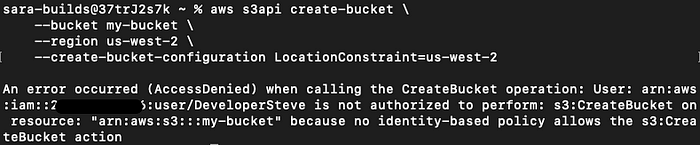
Recall that the Permissions Boundary Policy attached to Steve’s User allows any S3 action though s3:*. The identity-based policy attached to his User says he can only list the S3 buckets in his account s3:ListAllMyBuckets.
What will happen if Steve tries to create a new s3 Bucket?
aws s3api create-bucket \
    --bucket my-bucket \
    --region us-west-2 \
    --create-bucket-configuration LocationConstraint=us-west-2
Output Error:
What About Listing the S3 Buckets?
If Steve tries to list the buckets in his account, however, he is able to do that since the identity-based policy allows it.
aws s3api list-buckets --query "Buckets[].Name"Successful Output:

Steve Turns Bad…
Let’s say that Steve wants to starting mining crypto using a company EC2 instance as a new side hustle.
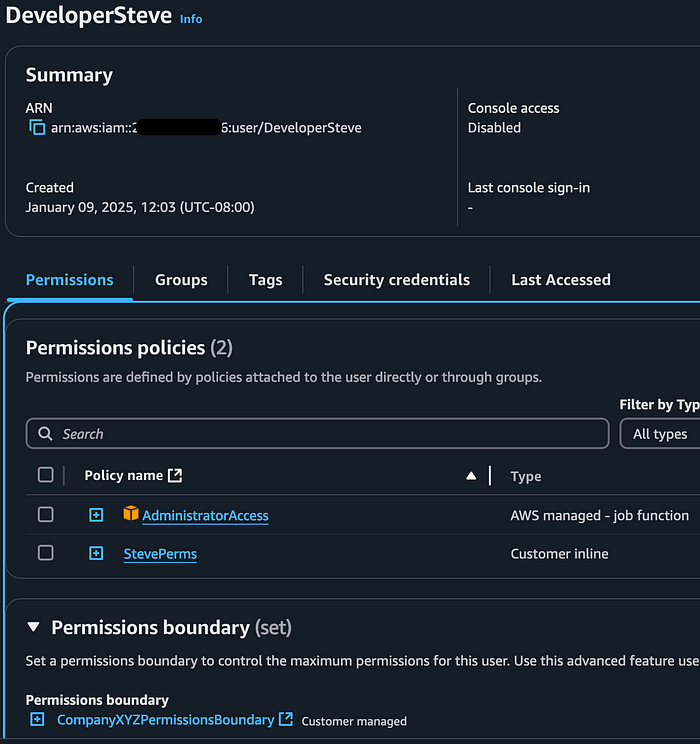
He attaches the Administrator Access Policy to his own IAM User so he can give himself the necessary permissions.
aws iam attach-user-policy \
    --policy-arn arn:aws:iam::aws:policy/AdministratorAccess \
    --user-name DeveloperSteve
This command successfully attached the Admin policy to his User.

This is what his permissions look like now:
What Can Steve Actually Do?
Although it seems like Steve may have the necessary permissions to setup an EC2 instance through Admin Access, he can’t actually take action to start his side hustle. This is because the Permissions Boundary attached to his User does not allow that action.
Let’s see what happens when he tries to create a KeyPair for a new EC2 instance.
aws ec2 create-key-pair --key-name StevesCryptoKeyPair --query 'KeyMaterial' --output text > StevesCryptoKeyPair.pemOutput Error:

What’s Next?
Implementing robust Permissions Boundaries requires a bit of forethought and planning to make sure you have potential escalation vectors covered.
For example, you’ll want to make sure the User or Role cannot remove the condition from their identity-based policy that requires the Permissions Boundary when creating a new User or Role . Also that the User or Role cannot detach or delete a Permissions Boundary policy.
I hope this gave you some food for thought and has helped you get started with using Permissions Boundaries.
References
Checkout my original post on Medium here.
 Luicd Tech Hub